Tuesday, April 20, 2021

Katie H - Warp


 The title of this image is warp. It was taken at my house back in January. It was taken with a Nikon Camera. I edited it first by manipulating the color, highlighting the hair, dodging/burning, etc. Then I went back and decided to add more elements to fit my portfolio better. I added a glitter pattern to her face and warped multiple images of the pattern on the outside. It is intended to show inner and outer beauty. It could be better maybe if I tied both of the patterns together somehow.  


MERIT O C - Spackle


The title of this image is Spackle. I took the picture over spring break this year at Gulf Shores.I took this picture with a canon rebel T7 with a 300mm lens. I originally edited the picture in color and made it more beachy. After I did that I decided to see what it would look like in black and white and I loved how it turned out. I think it would be better if the shadow under the hat wasn't so hard but other than that I really like how the picture came out.

Friday, April 16, 2021

Hannah R- Egg Hunt


 I took this image on Easter of my little cousins hunting for eggs. I used my Nikon D3500 to take this photo. I edited it by adding a filter to give it a warm tone. I then used the dodge and burn tool. I’m pretty happy with how it turned out.


Eduardo M- The invisible man


 I took this picture back in mid October for Forensic science, I took it with my iPhone XR, I added a filter to it, can't remember what specific filter I used. I think with some editing in photoshop would come out way better than it already is. Overall I love this picture.


Clay K- James Jockner


 The photo name is James Jockner.

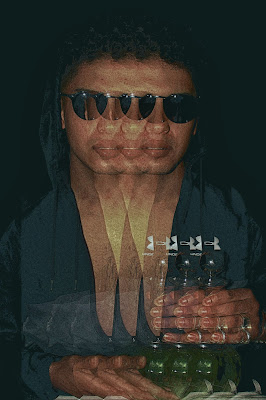
He was created during one of the composite portatiate assignments. He is made up of 6 different people. This picture is multiple filter layers and a lot of tone adjustments.


Jerusha K- Bad Guy


 This picture is called “Bad Guy”. I took this photo at Bluff Park with a couple of friends with my Canon rebel T7i. Disclaimer! This cigarette is fake! He does not smoke at all. Anyways This photo was fun and slightly different from what I do. I added a cigarette because he really had this stance which screamed bad boy vibes and it was a cool opportunity. I first edited the picture by decreasing the brightness of the sky. Also added a photo filter and increased the vibrance so I can get a warmer photo. The hardest part of this photo was adding the smoke to look realistic. I have never drawn anything like this so it was fun to experiment with it. I am pretty satisfied with this photo, but if I had to change anything I would try and make the smoke look even more realistic.


Wednesday, April 14, 2021

Emaleigh S- Red Roses


 This image is titled “Red Roses” because it is a self portrait which I put rose flower petals in my hair and edited it on my face too. These photo were taken in my backyard a week apart in March 2021. I took these photos with my iPhone 12 Pro Max. I edited this photo by first adding the full rose photo on top of my self portrait. I sharpened each image and made sure both photos had the same color tone and same level of saturation. I blurred the grass to focus more on the other colors in the image. I think this image would be better if it was taken with a more professional camera and probably if I didn’t take the photo myself. Other than that I think the photo is alright.

Jiya P - Blur


 The title of my image is Blue. I took this image for the Portrait assignment and I used Mr. Rigsby’s camera. I edited this using the clone tool, changing the tone, playing around with the texture and colors. I took this picture in the Photography studio with the lights off and having one light on and directed towards him.

Sasha C- Mitchell


 Mitchell, this picture was taken in the photography class studio, and it was taken during the 2nd period.   This picture was taken on Canon 26. The way I edited it is but playing around with the tool in Lightroom. I think this picture looks pretty cool. 


Tuesday, April 13, 2021

Evelyn C - Cups


  The name of my image is Cups and it was taken in my dining room. I used my Canon Rebel T6 camera to take the picture. I increased the saturation, contrast, and lighting initially. Then I messed around with the highlighting, burning, and brush tools on the colors of each cup. I then finished by using the brush tool with a hard edge and a different layer to overlay the image with a bunch of circles and making a random pattern.

I believe it could have been better if it was zoomed out and not so close up as well as lighting some more on certain cups like the Dark Roast cups because certain parts are too dark for me. Other than that I like how this came out. 

Hayden M - Drifty


 This picture is of a Miata at a drift event I went to earlier this year in Memphis, Tennessee. I tried to work on my panning shots and this one came out near perfect, the entire background is blurred while the entire car is in focus. Panning is honestly a very hard thing to do because there's so many factors that go into taking the shot, also with cars it’s even more difficult. The original shot was very overexposed because it was super sunny that day and I was shooting with a low shutter speed and my aperture turned all the way up, sadly I didn't have my ND filter with me either. I wish this picture was better in terms of editing, there just wasn’t much to really edit in the image because it was overexposed and there are very many different colors going on in it. Other than that this is definitely one of my top 10 images i’ve taken.


Julien F - Seahorse


 For my image Seahorse I took it with my iPhone 11 at the Atlanta aquarium a few months ago. I did some simple editing on my phone mostly boosting the saturation and the contrast. I really like this image and was happy to get such a cool shot of the fish. If I could redo this image I would have taken it on my camera instead and editing in photoshop to try and get a better focused shot as well has desaturate the background a bit to make the seahorse stand out more.

Jack J - Micheal Portrait


 This image is titled “Michael Skate” and it was taken last month behind an abandoned shopping center we skate at. This was taken with my Canon Rebel T3 and I edited the image by straightening the image and making it black and white. The image could be better if I got the skateboard to be clearer.


Friday, April 9, 2021

Kameron M - She


 The title of the selected image is She. It was taken in the art room last week with a Canon T6 Rebel. I edited it by lowering highlights and increasing the shadows. I added a B&W filter then adjusted the curves until it was somewhere I liked. I think the image could have been better if I had a better backdrop but I still like the way it came out in the end.


Ainsley M- Vintagey


 This photo was taken back in March at the Preserve Town Hall with my Nikon d3500. I started off by editing it in lightroom and played around with a few presets, and ended up making one with less clarity, highlights, and contrast. I wanted to keep the photo more light and airy so I brought the brightness up and exposure up a bit, as well as messing with the color to make the dress more yellow and less orange like it originally was. I also removed some things in the background from the walls, doors, and just anything that looked out of the ordinary. I feel like there is something I can do to make it better, but I really like how these pictures turned out! 

Mitchell C - Enthralled


 This image is named Enthralled. I took this picture in a friend's backyard in front of the forest behind her house. I put a flower behind her ear, and put a flower from the same bundle in front of the camera. I used my Canon camera 6d DSLR with my 85 mm 1.8. I edited using photoshop. I brought out the midtones and undertones, intensified the vibrance and contrast, and increased the saturation. I honestly do not know what I would have done differently, but I am very happy with the final result. 

Alana W- Motion Blur


 The title of this image is Motion Blur and I took this image March 11, 2021, with my Canon Rebel T6 camera in the studio. To get this shot I sed a shutter speed of 15 seconds and dragged lights around my friend in a dark room. I then edited this by adding a camera raw filter of blue and adding exposure to the camera raw filter. I then adjusted the brightness and contrast a bit and added a blur filter to my friend as found in the center of the image. I really love this image, it is the coolest shot I have ever taken with string lights and I feel like it could have been better if I left my friend unblurred in the center. 

Friday, April 2, 2021

Jack J - Keep Out


 This image is titled Keep Out and it was taken at Joe Tucker Park in Helena with my Canon Rebel T3. I edited this image by lowering the saturation and sharpening the image resulting in the old mossy effect I like. The image could be better if I was able to get closer to the door but I was barred off with a fence and if it was a sunnier day so the lighting would be better.


Bryson S - Imperfect


 There isn’t much special about this image, it was an image I took for the panorama assignment that I particularly liked, so I decided to edit it for the photoblog. To edit, I shifted the hue, added a vignette, and created an edge-detection filter to sharpen some of the details and blur some of the unnecessary highlights. I like the image overall, the premise of a single piece of a larger panorama being edited as an image is interesting to me. If I could do anything differently it would be to have taken another picture.

MERIT O- Pose


 The name of this picture is Pose. I took the picture downtown about a month ago. I used my canon rebel T5 to take the picture. I edited the image by making it black and white then I took the exposure down a little bit. I also took the contrast up a lot then messed around with the highlights, shadows, blacks, and whites. I think it could be better if I shot at a different time so the background wasn't so bright, but I’m happy with how the overall picture came out.